KPI Departments
This guide covers how you can create and manage your KPI departments.
To view your departments and create new ones:
- Navigate to the KPI module and main KPI dashboard
- Select the blue configuration option in the top righthand corner
- Select Manage Departments
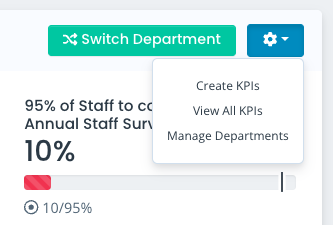
This will take you to a list view of your departments.
Click Create Department to make a new entry and enter the department name.
Dashboard Default
You will see you also have a tickbox entitled Dashboard Default. You will be able to set 1 department as the Dashboard Default - any KPIs assigned to that department will then appear within the KPI Widget on the SUMS dashboard, and the main KPI dashboard.
Alternatively, you can assign specific departments on a per-user basis to ensure they can see the KPIs relevant to their team from the off.
You do not need to set a Dashboard Default if you would prefer to apply different departments to each user, but it is a helpful feature if you would like to display core organisational KPIs to users when they log into SUMS.
You can change your Dashboard Default department if needed - simply modify the existing default to uncheck this option, and create/modify another department to select this option and make it the default.
Assigning KPIs to a Department
When creating a KPI you will be able to select the relevant department from a dropdown. The KPI will then appear to users when they are viewing that department.
You can only assign KPIs to 1 department, so if you are using a Core Organisational department or similar to show higher priority targets that span across different teams, keep in mind that they will not show up when users are viewing other departments.
Modifying, Archiving and Removing KPI Departments
You can modify a department at any time to change its name or adjust the Dashboard Default option.
You also have the option to either archive or completely remove a department. Archived and removed KPIs will not appear when creating/modifying a KPI.
You will be able to unarchive a department if you ever need to make it available again, but removing a department is irreversible.
Updated on 3rd February 2026