System Configuration & Permissions
This guide covers the settings and permissions available relating to the KPI module.
Permissions
The below user permissions relate to the KPI module:
- [KPIs] Dashboard - allows users to view the main KPI dashboard and the KPI widget on the main SUMS dashboard. Users can also switch which KPI department they're viewing within the main KPI dashboard
- [KPIs] Departments - allows users to create and modify KPI departments
- [KPIs] Manage KPIs - allows user to create and modify KPIs
Settings
One setting is available for KPIs which allows you to set default RAG ratings that can be automatically applied to your KPIs.
Auto RAG ratings can only be applied to Quantitative (Numerical) KPIs - you must manually set RAG ratings against Quantitative (%) and Qualitative KPIs.
Setting Auto RAG Ratings
- Navigate to System Configuration > Settings and scroll down to the KPIs section
- You will have fields to enter figures for Red, Amber and Green
- Enter the relevant figures to determine at what percentage a KPI will be displayed with that rating
- Click Submit when you're happy
You are entering a figure to determine at what percentage a KPI will display with that rating. For example, if you set Green to 75, Quantitative (Numerical) KPIs will be green when they reach 75% progress toward their target.
You can change these settings at any time, and KPIs where you have enabled auto RAG ratings will reflect the relevant rating as per your updates.
Applying Auto RAG Ratings to KPIs
When creating/modifying a Quantitative (Numerical) KPI you will have the option to Enable automatic RAG rating.
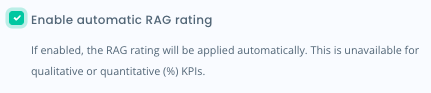
When selected, the RAG rating of the KPI will reflect the settings you have applied.
Auto RAG ratings are applied once the KPIs progress hits the figure given in your settings - if you have set Amber to 40, a KPI will convert to Amber once it hits 40% progress towards its target.
You will still have the option to manually apply RAG ratings to your Quantitative (Numerical) KPIs if you would prefer.
Updated on 3rd February 2026